> For the complete documentation index, see [llms.txt](https://guide.wiseapp.co.kr/llms.txt). Markdown versions of documentation pages are available by appending `.md` to page URLs; this page is available as [Markdown](https://guide.wiseapp.co.kr/lang/eng/wiseapp/screen-help/details/app.md).
# App Details
> Analyze key insights for apps in detail through a wide range of metrics.\
> You can download historical data and also download data for each indicator with OS filters applied.
## App Information
At the top of the screen, you can check the app’s current store information.\
You can add the app to Favorites using the button next to the app name or quickly move to the Compare screen.
Information
* **App Icon** : The icon registered in Google Play Store
* **App Name** : The name registered in Google Play Store
* [**Industry**](/lang/eng/wiseapp/terms.md#industry) : An industry category independently classified by WISEAPP based on app usage behavior.
* **Android Store Info**
1. [App Developer](/lang/eng/wiseapp/terms.md#app-develper) : Click to view rankings of apps by the same developer.
2. [Package Name](https://app.gitbook.com/o/DEk4tpDabKRSNdRbMwjf/s/sbt5GubEVpZd8zlMtOFr/~/edit/~/changes/25/wiseapp/terms#package-name) : Click to open the Google Play Store page.
3. [Category](/lang/eng/wiseapp/terms.md#store-category) : You can view category change history if it exists.
4. [Store Download Price](/lang/eng/wiseapp/terms.md#store-download-price) : Free or Paid
5. [Store Rating](/lang/eng/wiseapp/terms.md#store-rating)
6. [Store Download](/lang/eng/wiseapp/terms.md#store-download) : You can view change history if available.
* **iOS Store Info**
1. [App Developer](/lang/eng/wiseapp/terms.md#app-develper) : Click to view rankings of apps by the same developer.
2. [Package Name](https://app.gitbook.com/o/DEk4tpDabKRSNdRbMwjf/s/sbt5GubEVpZd8zlMtOFr/~/edit/~/changes/25/wiseapp/terms#package-name) : Click to open the App Store page.
3. [Category](/lang/eng/wiseapp/terms.md#store-category) : You can view category change history if it exists.
4. [Store Download Price](/lang/eng/wiseapp/terms.md#store-download-price) : Free or Paid
5. [Store Rating](/lang/eng/wiseapp/terms.md#store-rating)
{% hint style="info" %}
If the app is Android-only, only Android information is displayed.
{% endhint %}
***
## 1. All Users
You can understand apps' overall characteristics by analyzing key indicators and their correlations.
{% hint style="info" %}
You can set the period to Daily / Weekly / Monthly. However, when Daily is selected, only limited indicators are available.
{% endhint %}
### Key Indicators
This metric provides a comprehensive view of app performance by capturing the overall scale of app usage.
Indicator
* [**Installers**](/lang/eng/wiseapp/terms.md#installers)
* [**New Installers**](/lang/eng/wiseapp/terms.md#new-installers)
* [**Users**](/lang/eng/wiseapp/terms.md#users)
* [**User Growth Rate**](/lang/eng/wiseapp/terms.md#growth-rate)
* [**Total Time in App**](/lang/eng/wiseapp/terms.md#total-time-in-app)
* [**Avg. Time in App per User**](/lang/eng/wiseapp/terms.md#avg-time-in-app-per-user)
* [**Avg. Active Days per User**](/lang/eng/wiseapp/terms.md#avg-active-days-per-user)
* [**Total Sessions**](/lang/eng/wiseapp/terms.md#total-sessions)
* [**Avg. Number of Sessions per User**](/lang/eng/wiseapp/terms.md#avg-number-of-sessions-per-user)
* [**Avg. Session Length**](/lang/eng/wiseapp/terms.md#avg-session-length)
* [**Total Data Usage**](/lang/eng/wiseapp/terms.md#total-data-usage)
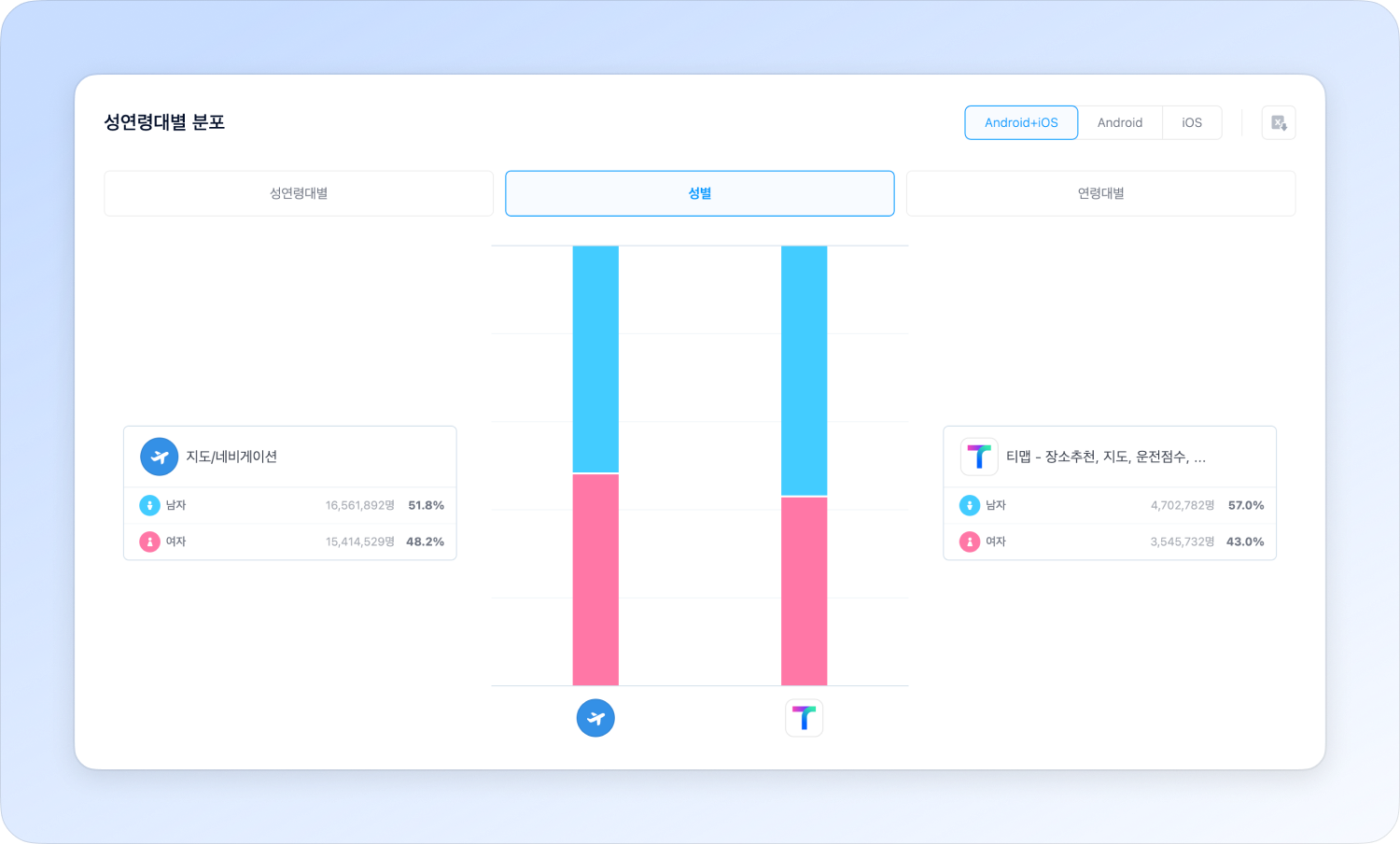
### Distribution by Gender and Age Groups
You can analyze the main user groups by checking user distribution by gender and age.
Indicator
* **By Gender and Age Groups** : 10s or under Male\&Female / 20s Male\&Female / 30s Male\&Female / 40s Male\&Female / 50s Male\&Female / 60s or more Male\&Female
* [**by Gender**](/lang/eng/wiseapp/terms.md#by-gender) : Male / Female
* [**by Age Group**](/lang/eng/wiseapp/terms.md#by-age-group) : 10s or under / 20s / 30s / 40s / 50s / 60s or more
### Average Users by Time Zone
Identify usage patterns by analyzing the times when users are most active on average.\
Data is available in 1-hour intervals throughout the day, with breakdowns by day of the week, gender, and age group.
Indicator
* **All** : The average users by time zone of all users
* **Day of the Week** : Monday / Tuesday / Wednesday / Thursday / Friday / Saturday / Sunday
* [**by Gender**](/lang/eng/wiseapp/terms.md#by-gender) : Male / Female
* [**by Age Group**](/lang/eng/wiseapp/terms.md#by-age-group) : 10s or under / 20s / 30s / 40s / 50s / 60s or more
### Average App Usage Cycle
Identify how frequently users return to the app by measuring the average number of days between uses for users who have used the app more than once.\
The minimum usage cycle is 1 day—shorter cycles indicate more frequent app usage.
### Retention
Represents the percentage of users who used the app in the previous period and returned to use it again in the current period, indicating overall user loyalty.
Indicator
* All : Retention of all users
* [**by Gender**](/lang/eng/wiseapp/terms.md#by-gender) : Male / Female
* [**by Age Group**](/lang/eng/wiseapp/terms.md#by-age-group) : 10s or under / 20s / 30s / 40s / 50s / 60s or more
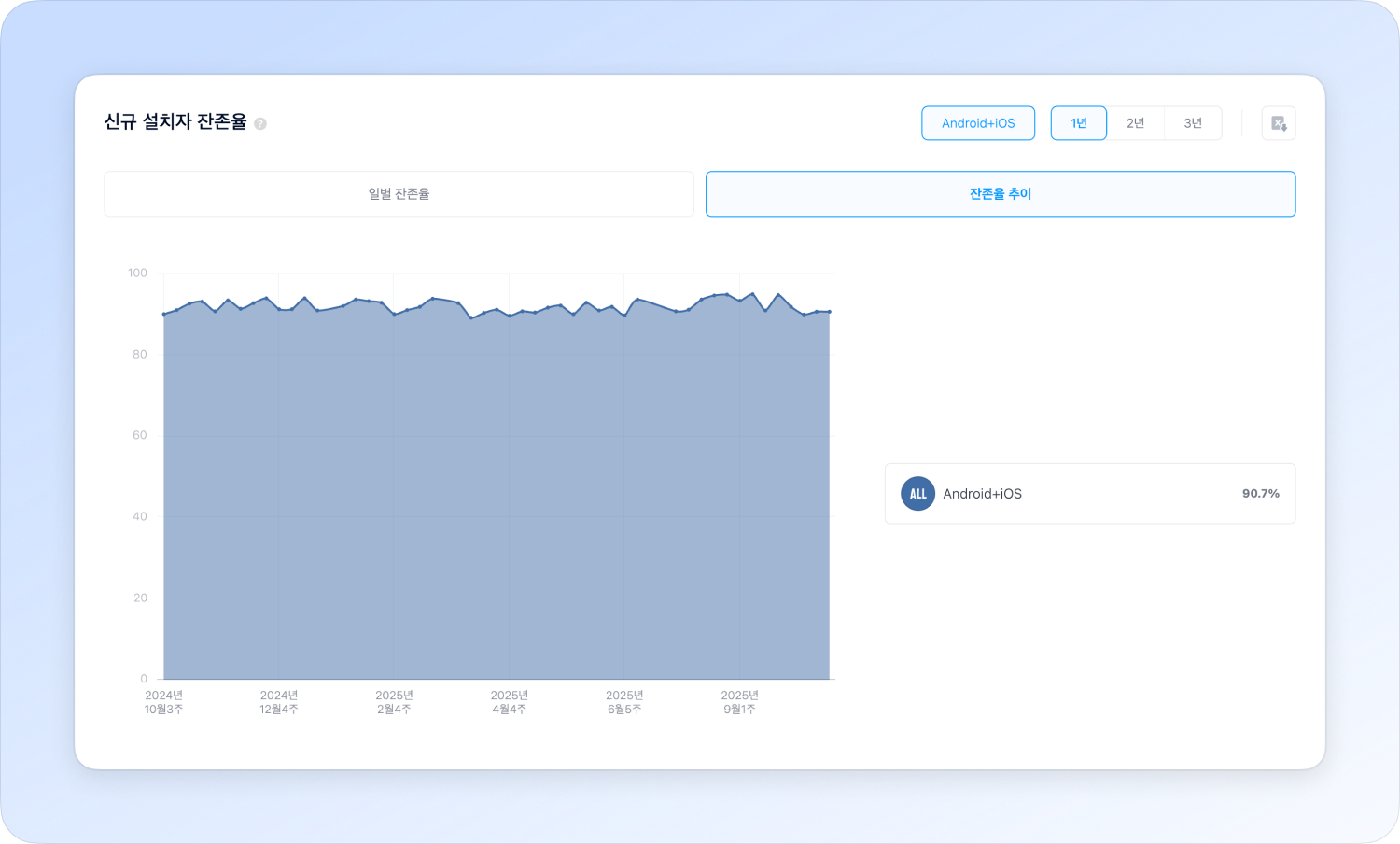
### New Installers Retention
Shows the retention rate of new installers who keep the app installed for X days after initial installation, reflecting user retention and satisfaction.
{% hint style="info" %}
* This metric is available starting from January 2017.
* If the number of new installers is too low, the metric may not be provided due to potential statistical inaccuracies.
{% endhint %}
Indicator
* **Daily Retention Rate** : Up to 7 days for weekly data, and up to the number of days in the month for monthly data.
* **Retention Trends** : Trend based on last day of week/month
{% hint style="info" %}
New Installers Retention is available only with the Android+iOS filter.
{% endhint %}
## 2. Users by Criteria
{% hint style="info" %}
You can set the period to Weekly / Monthly.
{% endhint %}
### Criteria
{% columns %}
{% column %}
Users by Criteria are divided into three groups according to loyalty.
Users by Criteria are divided into Light, Middle, and Heavy users.
The criteria for classifying groups are based on the average values of the selected indicator for 50% of the lower users and the criteria indicator average value for 50% of the upper users.
Criteria indicators provided are: Time in the App, Sessions, Days Used.
{% endcolumn %}
{% column %}
{% endcolumn %}
{% endcolumns %}
Filter
**Criteria Indicators**
* Time in App
* Sessions
* Days Used
### Key Indicators
You can analyze trends and changes between user groups.
Indicator
* [**Users**](/lang/eng/wiseapp/terms.md#users)
* [**Total Time in App**](/lang/eng/wiseapp/terms.md#total-time-in-app)
* [**Total Sessions**](/lang/eng/wiseapp/terms.md#total-sessions)
* [**User Growth Rate**](/lang/eng/wiseapp/terms.md#growth-rate)
* [**Avg. Time in App per User**](/lang/eng/wiseapp/terms.md#avg-time-in-app-per-user)
* [**Avg. Active Days per User**](/lang/eng/wiseapp/terms.md#avg-active-days-per-user)
* [**Avg. Number of Sessions per User**](/lang/eng/wiseapp/terms.md#avg-number-of-sessions-per-user)
* [**Avg. Session Length**](/lang/eng/wiseapp/terms.md#avg-session-length)
### Distribution by Gender and Age Groups
Compare how user composition differs across loyalty groups.
Indicator
* **By Gender and Age Groups** : 10s or under Male\&Female / 20s Male\&Female / 30s Male\&Female / 40s Male\&Female / 50s Male\&Female / 60s or more Male\&Female
* [**by Gender**](/lang/eng/wiseapp/terms.md#by-gender) : Male / Female
* [**by Age Group**](/lang/eng/wiseapp/terms.md#by-age-group) : 10s or under / 20s / 30s / 40s / 50s / 60s or more
### Industry VS Users by Criteria
Compare the following indicators between the app and its industry: Avg. Time in App per User, Avg. Number of Sessions per User, Avg. Active Days per User
Indicator
* [**Avg. Time in App per User**](/lang/eng/wiseapp/terms.md#avg-time-in-app-per-user)
* [**Avg. Number of Sessions per User**](/lang/eng/wiseapp/terms.md#avg-number-of-sessions-per-user)
* [**Avg. Active Days per User**](/lang/eng/wiseapp/terms.md#avg-active-days-per-user)
## 3. User Behavior
You can analyze user behavior by segmenting users based on how frequently and how long they use the app.
{% hint style="info" %}
You can set the period to Weekly / Monthly.
{% endhint %}
### Usage Time Distribution
Users can be divided into five groups based on app usage time.
\
By comparing these groups by gender and age group, you can identify user characteristics associated with different usage levels. Filter
* [**by Gender**](/lang/eng/wiseapp/terms.md#by-gender) : Male / Female
* [**by Age Group**](/lang/eng/wiseapp/terms.md#by-age-group) : 10s or under / 20s / 30s / 40s / 50s / 60s or more
### Distribution of Sessions
Users can be divided into five groups based on app launch frequency.
\
By comparing these groups by gender and age group, you can identify user characteristics associated with different launch frequencies.
Filter
* [**by Gender**](/lang/eng/wiseapp/terms.md#by-gender) : Male / Female
* [**by Age Group**](/lang/eng/wiseapp/terms.md#by-age-group) : 10s or under / 20s / 30s / 40s / 50s / 60s or more
### Apps Installed Together
You can identify related interests and competing apps by seeing which other apps the same users also installed.
Filter
* [**View Settings**](/lang/eng/faqs/service/view-settings.md) : Exclude Android only / View same industry
### Apps Used Together
You can identify related interests and competing apps by seeing which other apps the same users also used.
Filter
* [**View Settings**](/lang/eng/faqs/service/view-settings.md) : Exclude Android only / View same industry
### Industries Used Together
Understand usage context and lifestyle patterns through industries used together.
### Apps Used Before and After Using Apps
Analyze app switching behavior and usage flow by examining which apps are used before and after using this app.
Filter
* [**View Settings**](/lang/eng/faqs/service/view-settings.md) : Exclude Android only / View same industry
Indicator
* **Before use** : Ranked by the proportion of executions of other apps before using this app
* **After use** : Ranked by the proportion of executions of other apps after using this app
## 4. Industry VS App
Compare app with sub-industry to evaluate relative competitiveness in scale, usage, and frequency.
{% hint style="info" %}
You can set the period to Weekly / Monthly.
{% endhint %}
### Key Indicators
This metric reflects overall usage scale, enabling a comprehensive evaluation of app performance in comparison with the sub-industry.
Indicator
* [**Users**](/lang/eng/wiseapp/terms.md#users)
* [**Total Time in App**](/lang/eng/wiseapp/terms.md#total-time-in-app)
* [**Total Sessions**](/lang/eng/wiseapp/terms.md#total-sessions)
* [**User Growth Rate**](/lang/eng/wiseapp/terms.md#growth-rate)
* [**Avg. Time in App per User**](/lang/eng/wiseapp/terms.md#avg-time-in-app-per-user)
* [**Avg. Active Days per User**](/lang/eng/wiseapp/terms.md#avg-active-days-per-user)
* [**Avg. Number of Sessions per User**](/lang/eng/wiseapp/terms.md#avg-number-of-sessions-per-user)
* [**Avg. Session Length**](/lang/eng/wiseapp/terms.md#avg-session-length)
### User OS Distribution
Compare the OS usage distribution between the app and the industry.
### Distribution by Gender and Age Groups
You can analyze the main user groups by checking user distribution by gender and age.
Indicator
* **By Gender and Age Groups** : 10s or under Male\&Female / 20s Male\&Female / 30s Male\&Female / 40s Male\&Female / 50s Male\&Female / 60s or more Male\&Female
* [**by Gender**](/lang/eng/wiseapp/terms.md#by-gender) : Male / Female
* [**by Age Group**](/lang/eng/wiseapp/terms.md#by-age-group) : 10s or under / 20s / 30s / 40s / 50s / 60s or more
### Average App Usage Cycle
Identify how frequently users return to the app by measuring the average number of days between uses for users who have used the app more than once.\
The minimum usage cycle is 1 day—shorter cycles indicate more frequent app usage.
### Retention
Represents the percentage of users who used the app in the previous period and returned to use it again in the current period, indicating overall user loyalty.
Indicator
* **All** : The retention of all users.
* [**by Gender**](/lang/eng/wiseapp/terms.md#by-gender) : Male / Female
* [**by Age Group**](/lang/eng/wiseapp/terms.md#by-age-group) : 10s or under / 20s / 30s / 40s / 50s / 60s or more
## 5. Inflow and Churn
Analyze user movement flows by comparing [Inflow Users](/lang/eng/wiseapp/terms.md#inflow-users) and [Churn Users](/lang/eng/wiseapp/terms.md#churn-users).
{% hint style="info" %}
You can set the period to Weekly / Monthly.
{% endhint %}
Filter
* [**View Settings**](/lang/eng/faqs/service/view-settings.md) : Exclude Android only
Indicator
* **Inflow**\
: Users who previously used a different app and switched to this app in the current period. There may be overlapping users among different apps within the same industry.
* Ranking of inflow from the same industry
* **Churn**\
: Users who previously used this app and switched to a different app in the current period. There may be overlapping users among different apps within the same industry.
* Churn Users
* Ranking of churn from the same industry
* Churn to different industry
* **Time taken from last run to delete**\
: The average number of days from the last execution to app deletion among churned users.\
Measurement starts from the previous period of the selected timeframe, with a maximum range of 14 days for weekly data and 62 days for monthly data.
{% hint style="info" %}
“**0 day**” indicates users who installed and deleted the app on the same day, while “**– day**” indicates users who did not churn during the period.
{% endhint %}
---
# Agent Instructions
This documentation is published with GitBook. GitBook is the documentation platform designed so that both humans and AI agents can read, navigate, and reason over technical content effectively. Learn more at gitbook.com.
## Querying This Documentation
If you need additional information that is not directly available in this page, you can query the documentation dynamically by asking a question.
Perform an HTTP GET request on the current page URL with the `ask` query parameter, and the optional `goal` query parameter:
```
GET https://guide.wiseapp.co.kr/lang/eng/wiseapp/screen-help/details/app.md?ask=&goal=
```
`ask` is the immediate question: it should be specific, self-contained, and written in natural language.
`goal` is optional and describes the broader end goal you are ultimately trying to accomplish on behalf of the user. GitBook uses it to tailor the answer towards what is most useful for that goal.
The response will contain a direct answer to the question and relevant excerpts and sources from the documentation.
Use this mechanism when the answer is not explicitly present in the current page, you need clarification or additional context, or you want to retrieve related documentation sections.